
Deleted and lost media files, lost and damaged partitions, clicking hard drives, or faulty CDs and DVDs are examples of the frailty of our beloved digital data and their storage media. MiniTool Power Data Recovery helps you retrieve data that you thought lost forever due to accidental deletion or faulty storage devices. Its stress-free interface will guide you through the various recovery processes in a smooth and efficient way.
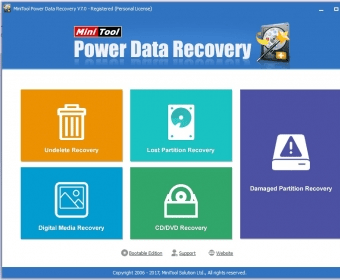
Undelete Recovery, Lost Partition Recovery, Digital Media Recovery, CD/DVD Recovery, and Damaged Partition Recovery are the five areas covered by this free recovery tool. Each of these options will open a dedicated wizard-like interface that will take you through the various simple steps required to retrieve your lost data. The process is very similar in all cases – the program will thoroughly scan the selected drive looking for either lost partitions or lost files, and will list for you everything that can still be recovered. You can search for specific files by file name or extension, by a size range, as well as by creation or modification date. The files selected can then be previewed before recovery as a Hexadecimal, text, or image file.
The entire process runs smoothly and fast, regardless of the type of data and storage device you’re trying to bring back to life. This is, together with its reliability, one of the program’s main assets – its excellent interface design and the neatly structured wizards that take away as much stress as possible from those already stressful recovery processes. more






Comments (2)